ReachMaster User Interface
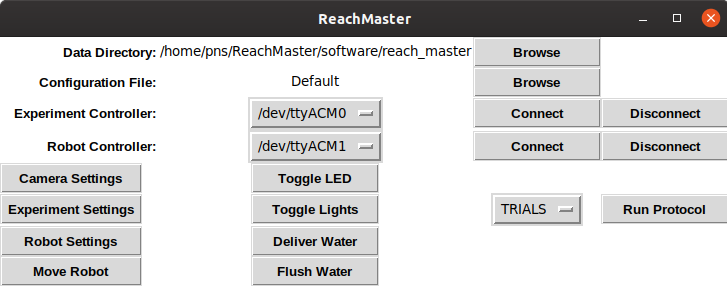
The primary graphical user interface used to control and run experiments.
- Example:
From terminal:
$ python reach_master.py
- Todo:
Create executable
Automate unit tests
Root Application Window
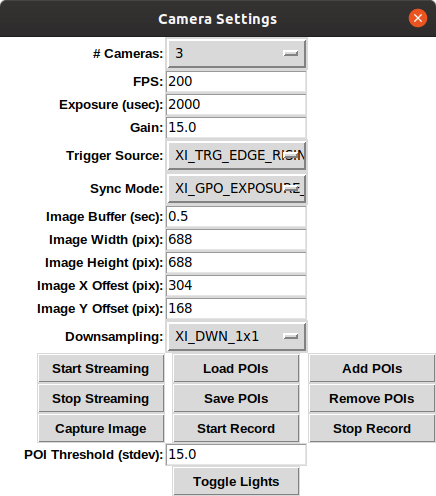
Camera Settings
Experiment Settings
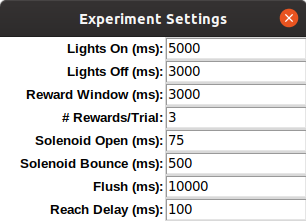
The experiment settings window is opened as a child of the ReachMaster root application. It allows the user to set any experiment parameters required by the experiment microcontroller (e.g., number/size of rewards, trial delays, etc.).
- class reachmaster.settings.experiment_settings.ExperimentSettings(parent)[source]
The primary class for the experiment settings window.
- config
The current configuration settings for the application
- Type
dict
- lights_on_dur
Tkinter StringVar that captures the user-selected duration (ms) lights should remain on during a trial when protocol type is ‘TRIALS’. If a reach is not detected in under this duration, the lights will turn off until the next trial is intitiated.
- Type
instance
- lights_off_dur
Tkinter StringVar that captures the user-selected duration (ms) lights should remain off between trials when prtocol type is ‘TRIALS’.
- Type
instance
- reward_win_dur
Tkinter StringVar that captures the user-selected duration (ms) for which rewards rewards are delivered once the handle is successfully pulled into the reward zone.
- Type
instance
- max_rewards
Tkinter StringVar that captures the user-selected maximum number of rewards (int) delivered for a successful reach.
- Type
instance
- solenoid_open_dur
Tkinter StringVar that captures the user-selected solenoid open duration (ms) which sets the individual reward size. Solenoid calibration must be performed to get the mapping from duration (ms) to volulme (mL).
- Type
instance
- solenoid_bounce_dur
Tkinter StringVar that captures the user-selected minimum duration (ms) the solenoid should remain closed between reward deliveries. Note the redundancy with reward_win_dur and max_rewards.
- Type
instance
- flush_dur
Tkinter StringVar that captures the user-selected duration (ms) the solenoid should remain open while flushing the lines.
- Type
instance
- reach_delay
Tkinter StringVar that captures the user-selected minimum duration animals are required to wait before attempting a reach after a trial is initiated when protocol type is ‘TRIALS’. Once the lights turn on, if a reach is attempted before the end of the delay, the trial is haulted and the lights are turned off. This enforces a timeout period to discourage animals from performing reaches between trials.
- Type
instance
Robot Settings

The robot settings window is opened as a child of the ReachMaster root application. It allows the user to set any parameters required by the robot microcontroller (e.g., position smoothing, valve periods etc.), or having to do with the robot kinematics. It provides options for the user to select previously generated calibration and position command files. Soon it will allow users to run a robot calibration routine from within the ReachMaster application.
- Todo:
Add labels to specify the microcontroller/kinematics parameters
Run calibration callback
Re-add load calibration callback?
Automate unit tests
- class reachmaster.settings.robot_settings.RobotSettings(parent)[source]
The primary class for the robot settings window.
Configures and provides window callback methods. Also provides methods to select robot calibration files, position command files, as well as methods used to sample positions from the command file. The on_quit() method is called prior to application destruction.
- config
The current configuration settings for the application
- Type
dict
- pos_smoothing
Tkinter StringVar that captures the user-selected position smoothing parameter (0-1, 0 less smoothing).
- Type
instance
- tol
Tkinter StringVar that captures the user-selected tolerance (bits) for accepting robot convergence to the command position. (i.e., the L2-norm of the potentiometer readings must be less than tol).
- Type
instance
- period
Tkinter StringVar that captures the user-selected valve period (us). Equivalent to pulse width modulation (PWM) period.
- Type
instance
- off_dur
Tkinter StringVar that captures the user-selected minimum off duration (ms) that is enforced between convergence times. Once the robot converges to a command position, it will not move to a new command position for this duration.
- Type
instance
- num_tol
Tkinter StringVar that captures the user-selected number of consecutive periods the robot must be within convergence in order to be considered “in position”.
- Type
instance
- (x/y/z)_(push/pull)_wt
Tkinter StringVar that captures the user-selected weighting coefficient placed on the x/y/z actuator in the push/pull direction. Acts as a gain on the calibration coefficients. Typically defaults to 1 for a good calibration, but gives the user an option to make quick manual adjustments without runnning an entirely new calibration. Not used very often in practice.
- Type
instance
- rew_zone_x
Tkinter StringVar that captures the user-selected minimum x position (bits) the handle must cross in order to enter the reward zone.
- Type
instance
- rew_zone_(y/z)_(min/max)
Tkinter StringVar that captures the user-selected min/max x/z positions (bits) the handle must be within in order to be located in the reward zone. Conditions must be satisfied on all actuators simultaneously.
- Type
instance
- calibration_file
Tkinter StringVar that captures the user-selected robot calibration file.
- Type
instance
- command_file
Tkinter StringVar that captures the user-selected position command file.
- Type
instance
- command_type
Tkinter StringVar that captures the user-selected option determining how commands are generated. Can be read_from_file, sample_from_file, or parametric_sample. The read_from_file option takes the commands directly from the command file. The sample_from_file option generates a sequence of commands by sampling from the command file with replacement. The parametric_sample option does not use the command file. Rather, it samples commands uniformly from the reach volume determined by user-selected inverse kinematics parameters.
- Type
instance
- (y/z)gimbal_to_joint
Tkinter StringVar that captures the user-measured center-to-center distance (mm) from an y/z gimbal to its respective spherical joint (link to hardware page).
- Type
instance
- (x/y/z)gimbal_(x/y/z)offset
Tkinter StringVar that captures the user-measured offset (mm) of the (x/y/z) gimbal from the origin in the (x/y/z) direction.
- Type
instance
- (x/y/z)_origin
Tkinter StringVar that captures the user-measured (x/y/z) position (bits) of the origin.
- Type
instance
- reach_dist_(min/max)
Tkinter StringVar that captures the user-specified (min/max) reach distance of the reach volume.
- Type
instance
- reach_angle_max
Tkinter StringVar that captures the user-specified max reach angle (rad) of the reach volume.
- Type
instance
- calibration_browse_callback()[source]
Allows the user to select a calibration file to be loaded to the robot microcontroller.
- command_browse_callback()[source]
Allows the user to select a position command file to be loaded to the robot microcontroller.
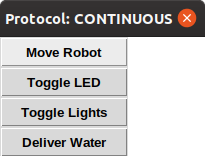
Protocols
Camera Interface
Experiment Interface
This module provides a set of functions for interfacing with the experiment microcontroller. It provides functions to recognize and establish serial connections to the controller, read/write settings, execute common callbacks located in the other modules, and read/write custom messages.
- Todo:
Object orient
Automate unit tests
Limit custom messages by absorbing communication codes from protocols module
- reachmaster.interfaces.experiment_interface.deliver_water(exp_controller)[source]
Send a message to experiment controller to open the solenoid for the user-selected reward duration.
- Parameters
exp_controller (serial.serialposix.Serial) – The serial interface to the experiment controller.
- reachmaster.interfaces.experiment_interface.flush_water(exp_controller)[source]
Send a message to experiment controller to opens the solenoid for the user-selected flush duration.
- Parameters
exp_controller (serial.serialposix.Serial) – The serial interface to the experiment controller.
- reachmaster.interfaces.experiment_interface.get_ports()[source]
List all serial port with connected devices.
- Returns
port_list – Names of all the serial ports with connected devices.
- Return type
list(str)
- reachmaster.interfaces.experiment_interface.move_robot(exp_controller)[source]
Send a message to experiment controller to command the robot to move to the next position in its command sequence.
- Parameters
exp_controller (serial.serialposix.Serial) – The serial interface to the experiment controller.
- reachmaster.interfaces.experiment_interface.read_response(exp_controller)[source]
Read a line of data from the experiment controller in response to the most recently written message.
- Parameters
exp_controller (serial.serialposix.Serial) – The serial interface to the experiment controller.
- Returns
response – The line of data received from the experiment controller in response to the most recently written message.
- Return type
str
- reachmaster.interfaces.experiment_interface.set_exp_controller(exp_controller, config)[source]
Load the experiment settings to the experiment controller.
- Parameters
exp_controller (serial.serialposix.Serial) – The serial interface to the experiment controller.
config (dict) – The currently loaded configuration file.
- reachmaster.interfaces.experiment_interface.start_experiment(exp_controller)[source]
Send a message to experiment controller to begin executing an experiment protocol.
- Parameters
exp_controller (serial.serialposix.Serial) – The serial interface to the experiment controller.
- Returns
response – The first line of data received from the experiment controller verifying that the protocol has been initiated.
- Return type
str
- reachmaster.interfaces.experiment_interface.start_interface(config)[source]
Establish a serial connection with the experiment controller.
- Parameters
config (dict) – The currently loaded configuration file.
- Returns
exp_controller – The serial interface to the experiment controller.
- Return type
serial.serialposix.Serial
- reachmaster.interfaces.experiment_interface.stop_interface(exp_controller)[source]
Perform a soft reboot of the experiment controller and close the serial connection.
- Parameters
exp_controller (serial.serialposix.Serial) – The serial interface to the experiment controller.
- reachmaster.interfaces.experiment_interface.toggle_led(exp_controller)[source]
Send a message to experiment controller to toggle the LED located on the robot handle.
- Parameters
exp_controller (serial.serialposix.Serial) – The serial interface to the experiment controller.
- reachmaster.interfaces.experiment_interface.toggle_lights(exp_controller)[source]
Send a message to experiment controller to toggle the neopixel lights.
- Parameters
exp_controller (serial.serialposix.Serial) – The serial interface to the experiment controller.
- reachmaster.interfaces.experiment_interface.trigger_image(exp_controller)[source]
Send a message to experiment controller to trigger the cameras to capture an image.
- Parameters
exp_controller (serial.serialposix.Serial) – The serial interface to the experiment controller.
- reachmaster.interfaces.experiment_interface.write_message(exp_controller, message)[source]
Read a line of data from the experiment controller in response to the most recently written message.
- Parameters
exp_controller (serial.serialposix.Serial) – The serial interface to the experiment controller.
message (str) – A string that is recognizeable by the experiment controller.
Robot Interface
Configuration Files
Module for working with configuration files.
Configurations files are json files that store all the settings used in a ReachMaster session. Functions are provided to generate default configuration files, as well as to save and load previous configurations. This encourages persistence of settings across experiments.
- reachmaster.config.default_config()[source]
Generate a configuration populated with sensible defaults.
- Returns
A default configuration.
- Return type
dict
- reachmaster.config.load_config(file_handle)[source]
Load a configuration file.
Typically loads a file selected by user from the configuration browser in the root ReachMaster application window.
- Parameters
file_handle (file) – An open, previously saved json configuration file.
- Returns
A default configuration.
- Return type
dict
- reachmaster.config.save_config(config)[source]
Save a configuration file.
This is typically called upon closing application if the user responds yes to the save prompt. The configuration is given the current datetime as a name and saved to a json in the config folder of the user-selected data output directory.
- Parameters
config (dict) – The currently loaded configuration.
- reachmaster.config.save_tmp(config)[source]
Save the configuration to a temp file.
The global state of ReachMaster is tracked using a temp file. Whenever a child window of the main application is created or destroyed, the temp file is updated to reflect whatever changes in settings may have occurred. If the user forgets to save the configuration file at the end of a session, this temp file can be used for recovery. It is saved to the temp folder in the ReachMaster root directory. Warning: the temp file is reset to the default configuration whenever a new instance of ReachMaster is started!
- Parameters
config (dict) – The currently loaded configuration.